How it works
static page<Image>One file. The whole stack.
Pulse is a real status page built to exercise every Pyxle feature — Python loaders and React UI in the same .pyxl file, server-rendered and hydrated. This page itself is statically generated.

The feature map
Everything Pulse demonstrates
Server
- /incidents/[id]
File-based routing
Static, dynamic [id], nested
- every page
@server loaders
Async data, colocated in the page
- / status
ISR caching
{ data, revalidate } envelope
- this page
Static generation
No loader · pyxle build --static
- /report
@action + Pydantic
Typed body, 422 field errors
- /report · subscribe
Background tasks
Work after the response
- unknown incident
error.pyxl + LoaderError
Status-aware boundary
Realtime
- incident war room
WebSockets
websocket(ws) in the page file
- live timeline
pyxle.realtime
channel() pub/sub broadcast
- live room
useWebSocket
status · send · lastMessage
- /incidents/*
Streaming SSR
Shell-first · loading.pyxl
Client
- this page
<Image>
CLS-safe, lazy, priority
- keyboard shortcuts
<Script>
Self-hosted, afterInteractive
- subscribe below
<Form>
Progressive enhancement
- /report
useAction
pending · error · fields
- everywhere
<Head> / <Link> / navigate
Per-page meta · SPA nav
- timestamps
<ClientOnly>
Hydration-safe relative time
Platform
- /responders
pyxle-auth
useAuth · session · responder sign-in
- data layer
pyxle-db
Migrations · transactions
- /api/__pulse/metrics
Observability
request-id · Prometheus metrics
- 600 / min
Rate limiting
Token bucket, config-driven
- every response
Custom middleware
Server-Timing header
- /api/healthz
API routes
pages/api/*.py
The request flow
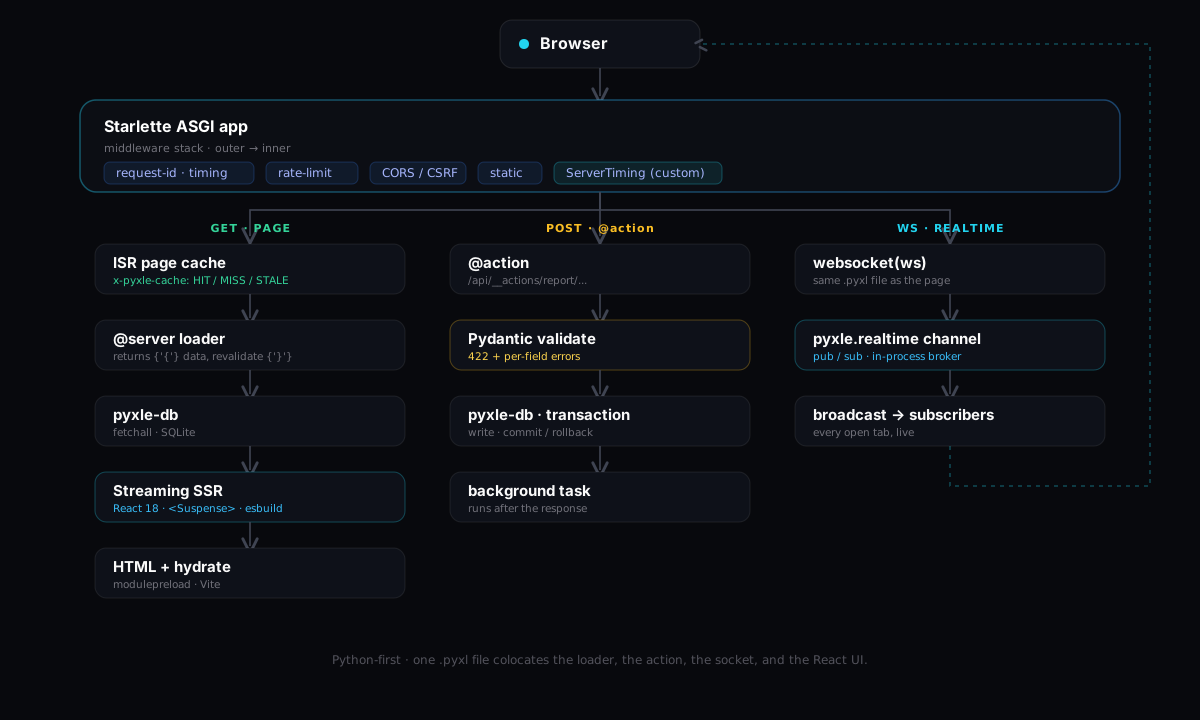
How a request travels
Every request enters the same middleware stack, then fans out into one of three lanes — a cached page render, a validated action, or a realtime socket.
Read the source
It really is just Python
No magic. Open any surface in the demo and the code is exactly what you'd expect.
Stay in the loop
<Form>Pydanticbackground taskGet notified about incidents
This form posts to a Pydantic-validated @action and works even without JavaScript. A bad address comes back inline; a good one queues a confirmation.